403-519-1890

- Jan 12, 2026 |
- Ergonomics Blog
Two New Ergonomic Keyboards Worth Considering
With Microsoft’s Sculpt Ergonomic Keyboard now discontinued, many people have been searching for a compact, fixed-split ergonomic keyboard with a similar feel – —particularly those managing wrist, forearm, or finger discomfort during prolonged computer use.
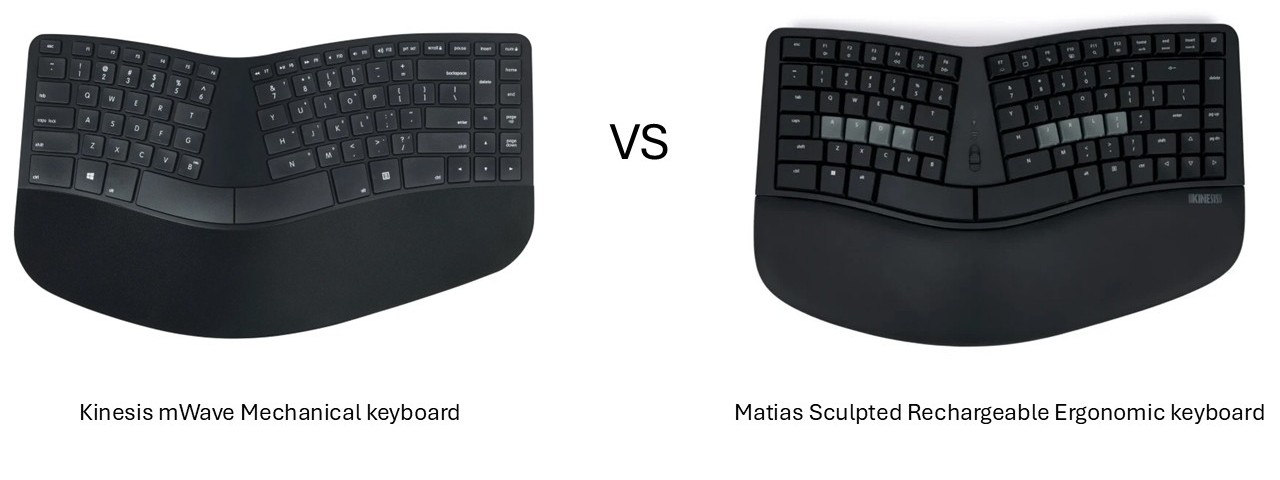
Two strong contenders recently entered the market (2025): the Kinesis mWave Mechanical Keyboard and the Matias Sculpted Ergonomic Keyboard.
Both manufacturers clearly recognized the demand for a Sculpt-style design—but each product brings its own ergonomic strengths, trade-offs, and typing experience. This overview highlights key design differences, ergonomic considerations, and practical features to help you decide which keyboard best suits your needs.
Design & Ergonomic Features
Shared Features
Both keyboards offer:
-
- A compact layout with a fixed split angle and wave design. This design allows the mouse to be brought closer to the body, thus reduces a lateral reach. Some users, generally with a narrower shoulder girdle, find the compact keyboard much more comfortable for their shoulders and neck. The split angle allows the wrists to remain in a more neutral position when typing, reducing ulnar deviation and helps to relax the muscles in the forearms.
- A tenkeyless footprint (access the embedded numeric keypad using a function key) – for those people who really prefer having a number pad.
- Optional negative tilt using magnetic feet or a tilt bar, helping to reduce wrist extension.
Where They Differ
Kinesis mWave
-
- Padded palm rest with a leather-like, washable surface
- White LED backlighting (available in wired mode)
- Slightly higher profile than the Matias
- Connectivity options: wired or Bluetooth, with memory for two paired devices
- A little noisier than the Matias, however, a quieter version has just been released.
Matias Sculpted Ergonomic
-
- Very similar in shape and concept to the Microsoft Sculpt
- Palm rest made of natural rubber, magnetically attached for easy cleaning or replacement
- Wired and wireless versions available
- Lower-profile design overall
Typing Feel & Switch Differences
A major distinction between these keyboards comes down to their switch mechanisms.
Kinesis mWave
- Features low-profile Gateron Brown mechanical switches
- 55 g actuation force
- 3.0 mm total travel
- Dimensions:
-
- Width: 15.25″ (38.7 cm)
- Depth: 9.5″ (24.1 cm)
- Height: 1.75″ (4.4 cm)
-
- Provides more tactile and audible feedback than membrane or scissor keys.
- Highly programmable.
Matias Sculpted Ergonomic
- Uses Matias scissor switches, known for crisp, quiet, and reliable performance.
- Shorter travel (~2 mm) and a softer feel, ideal for quiet or shared office environments.
- Dimensions:
-
- Width: 15.29″ (38.8 cm)
- Depth: 9.08″ (23.1 cm)
- Height: 1.42″ (3.6 cm)
-
- Highly programmable.
Ergonomic Considerations & Trade-Offs
Kinesis mWave
- Best suited for heavy typists or users who prefer mechanical feedback.
- Low-profile mechanical switches combined with the fixed split angle may help reduce finger strain.
- Backlighting is an advantage for low-light setups.
- Slightly taller profile may matter for users who prefer a lower hand position.
Matias Sculpted Ergonomic
- Most familiar for users transitioning from the Microsoft Sculpt
- Scissor switches provide a quieter, softer typing experience.
- The palm rest offers a stable, comfortable surface and can be replaced.
- Lower profile may feel more natural for extended typing sessions.
- However, the wired model does not offer backlighting.
|
Ergonomist’s Insight: While switch type affects typing comfort overall hand posture, desk height and chair setup often have a greater impact on pain and fatigue than the keyboard alone. |
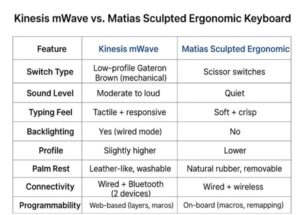
For a quick, side-by-side overview, the table below summarizes the key differences between the two keyboards.
Which One Should You Choose?
|
If you’re still unsure which keyboard would best support your ergonomic needs or workflow style, feel free to reach out. Anderson Ergonomics Consulting regularly helps clients select input devices and fine-tune workstation setups to reduce discomfort and improve long-term comfort and productivity.